

I just passed AI-901, the new Microsoft Azure AI Fundamentals exam that replaces AI-900 (which retires on June 30, 2026). If you've started your AI-901 exam preparation, you've already noticed the problem: there's barely any AI-901 study material out there yet, and no official AI-901 practice test. So while it was fresh, I wrote down exactly what's on it and where the points hide. In addition, I made a 40 questions practice assessment for you to practice and a PDF version of this AI-901 study guide and cram sheet.
⚠️ Read this first. AI-901 is brand new. Official content is still thin, there’s no official practice assessment yet, and Microsoft can adjust the exam at any time. Everything below reflects the public study guide and my own sitting as of July 2026 — treat it as a field guide, not gospel.
This is the study guide I wish I’d had. Let’s get you certified.
How the AI-901 exam splits — and where the points are
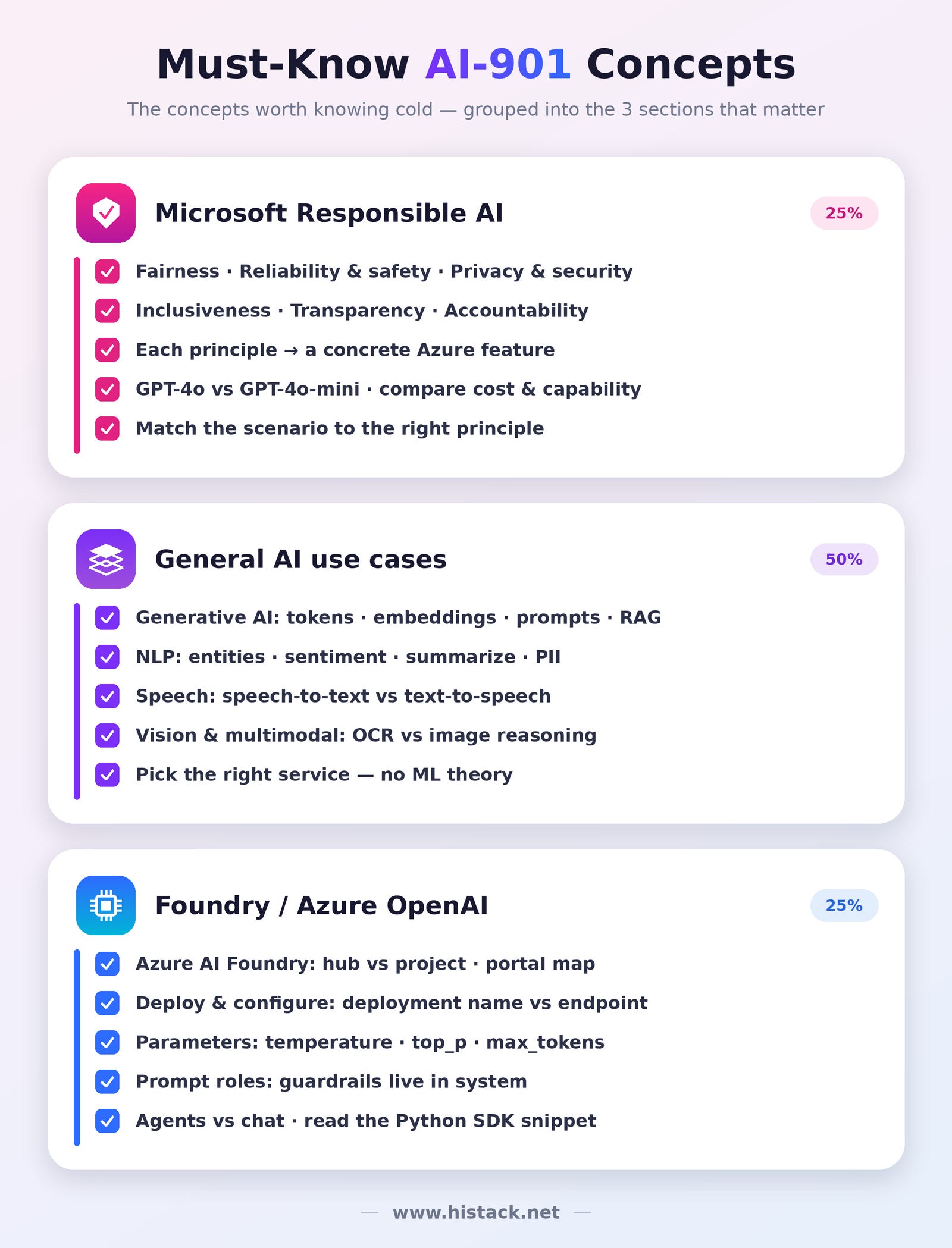
The cleanest way to think about AI-901 is three buckets. These question counts are my own read from the exam, not official weights — but they’ll tell you where to spend your energy:
Microsoft Responsible AI — 25% of the exam
General AI use cases (generative AI, NLP, and vision in a multimodal context — no classic ML theory) — 50% of the exam
Foundry / Azure OpenAI — (the hardest, with the least Microsoft Learn coverage) - 25% of the exam
The one-line strategy: Sections 1 and 2 are your easy, bankable points — learn them properly and you walk in with momentum.
🚫 What is NOT in the AI-901: classic machine-learning theory. I got zero questions on supervised vs unsupervised learning, regression, or classification. Don’t spend a minute studying it. This a major difference with the AI-900.
Two facts that should change how you prepare:
It’s not open book. Information from different sources diverge on this point. In my case, there was no access to MS Learn documentation.
Python is read, not write. You’ll be shown a 10–15 line SDK snippet and asked what it does or which line breaks it. You never have to write code.
The rest of the essentials: passing score 700/1000, roughly 40–60 questions (In my case, it was 42), about 45–60 minutes.
And the overall vibe is implementation-aware — expect portal screens and code-reading, not just textbook definitions.
AI-901 - Microsoft Responsible AI (learn all six principles)
This is the section people underestimate. On AI-901, Responsible AI is widely tested, the closest thing to free points on the exam, if you can match a scenario to the right responsible-AI principle. The AI-901 exam rarely asks for a definition in the abstract; it describes a situation and asks which principle applies, and often which Azure feature upholds it.
So learn all six concepts, a concrete example, and the Azure feature it maps to.
Fairness
Concept: the system treats all groups equitably, without bias.
Example: a loan-approval model rejects far more applicants from one neighborhood, that’s a fairness failure.
On Azure: fairness assessments and balanced training data.
Reliability & safety
Concept: the system behaves consistently and safely, even with unexpected or hostile input.
Example: a chatbot refuses to produce harmful content and stays stable under weird prompts.
On Azure: content filters and model evaluation.
Privacy & security
Concept: personal and sensitive data is protected end to end.
Example: customer PII never leaks into a response or a log.
On Azure: managed identities and private endpoints.
Inclusiveness
Concept: the solution works for people of all abilities, languages, and backgrounds.
Example: captions for audio and multilingual support so no one is shut out.
On Azure: accessibility and multilingual capabilities.
Transparency
Concept: people can understand how the system works and why it made a decision.
Example: being able to explain why an applicant was rejected.
On Azure: model cards.
Accountability
Concept: humans remain responsible for the system’s outcomes.
Example: a reviewable record of what the AI did and who signed off.
On Azure: audit logs and abuse monitoring.
Quick recap:
Fairness — equitable across groups. On Azure: fairness assessment / balanced data.
Reliability & safety — consistent and safe under stress. On Azure: content filters + evaluation.
Privacy & security — protects data. On Azure: managed identities / private endpoints.
Inclusiveness — works for everyone. On Azure: accessibility & multilingual.
Transparency — understandable decisions. On Azure: model cards.
Accountability — humans stay responsible. On Azure: audit logs + abuse monitoring.
If you can read a scenario and instantly name the principle and the feature, you’ve banked this whole section.
AI-901 - General AI use cases (pick the right service)
Section 2 is really one skill dressed up many ways: read a scenario and choose the right task or service — often in a multimodal setting. Memorize this decision tree and most of these questions answer themselves:
Content Understanding (build an analyzer) → describe the fields you want in plain language; an LLM reasons over docs, images, audio or video and returns structured JSON
Content Understanding – Read → OCR text from a page or image
Content Understanding – Layout → text, tables, selection marks, structure
Document Intelligence prebuilt → known forms: invoices, receipts, IDs, business cards
Azure Speech → speech-to-text and text-to-speech
Azure Language → sentiment, entities, PII, summarization
Azure OpenAI / Foundry models → generate, reason, or understand an image
NLP (Azure AI Language). Entity recognition (NER), key phrase extraction, sentiment analysis, PII detection, language detection, summarization.
Entity recognition categorizes specific things (people, dates, organizations);
Speech (Azure AI Speech). The distinction I’d bet on seeing: speech recognition = speech-to-text (transcribe a call-center recording) vs speech synthesis = text-to-speech (a navigation app reading directions aloud, with neural voices). Recognition listens; synthesis speaks.
Vision & multimodal. Azure AI Vision handles captions, tags, and OCR. But a deployed multimodal model (like GPT-4o) can read an image directly in the prompt and reason about it. Extracting text off a scanned form is OCR; asking “what’s unusual in this photo?” is multimodal reasoning.
The extraction trap — Content Understanding vs Document Intelligence. This one’s a favorite:
Content Understanding — you describe the fields you want in natural language, it handles multimodal sources (documents, images, audio, video), and returns structured JSON. Choose it for free-form or non-document input.
Document Intelligence prebuilts — deterministic extraction from known form types (invoices, receipts, IDs).
Generative AI basics. Know the vocabulary plainly: tokens (chunks of text), embeddings (numeric vectors of meaning), prompts (your input), grounding / RAG (feeding the model your own data so answers stay accurate), and hallucination (confident but wrong output).
AI-901 - Foundry / Azure OpenAI
This is the hard bucket and the one with the thinnest Microsoft Learn coverage when I sat it. Slow down here.
Azure AI Foundry — the platform
Foundry is the unified platform to build, evaluate, and deploy AI on Azure. It pulls together the Foundry portal, the model catalog, the Foundry SDK, the Agent Service, prompt flow / evaluation, and the integrated Azure AI services (Speech, Vision, Content Understanding, Search) exposed as Foundry Tools.
Hub vs Project — the classic trap. A hub is the top-level collaboration and governance container: shared security, connections, compute, and quota.
A project lives inside a hub and is where you actually build — deployments, agents, data, evaluations. One hub → many projects.
Portal map to recognize on screen: Model catalog → Model card → Deployments → Playground → Agents → Evaluation. Questions describe or show these tabs, so know what each one does.
Deploy & configure a model
The catalog holds Azure OpenAI models (GPT-4o, GPT-4o-mini for cheap/fast, embeddings, DALL·E for images), open-weight models, and Microsoft-published models. Pick by capability — multimodal for image/speech input, a small model for cost and latency.
Deployment options that show up as answers: region, capacity (tokens-per-minute / quota), and the content filter attached to the deployment. Crucial detail: the deployment name — not the base model name — is what your code calls.
temperature — higher = more creative/random; lower = more deterministic. Exam cue: “consistent, repeatable output” → low temperature.
top_p — nucleus sampling, an alternative to temperature (tune one, not both). Exam cue (distractor): “set both to 1 for accuracy.”
max_tokens — caps response length (prompt + completion share the context window). Exam cue: “response got cut off” → raise max_tokens.
Prompt roles — the single most-tested distinction
system — sets persona, tone, rules & guardrails for the whole conversation. Contains: “Be formal”, “only answer HR policy”, “stay on topic”.
user — the end-user’s actual request this turn. Contains: “Summarize this contract.”
assistant — prior model replies, replayed to give conversational memory. Contains: earlier answers in the thread.
🎯 The trap: behavioral instructions (”respond formally”, “stay on topic”) belong in the system prompt. Putting them in the user prompt or in deployment settings is the planted wrong answer.
Reading the Foundry SDK (Python)
You won’t write this — you’ll read it.
python
from azure.identity import DefaultAzureCredential
from azure.ai.projects import AIProjectClient

project = AIProjectClient(                       # 1. connect to the project
    endpoint=”https://<proj>.services.ai.azure.com/api/projects/<name>”,
    credential=DefaultAzureCredential())         #    Entra ID, not an API key

client = project.get_openai_client()             # 2. OpenAI-compatible client

resp = client.chat.completions.create(
    model=”gpt-4o-mini”,                         # 3. the DEPLOYMENT name
    messages=[
        {”role”: “system”, “content”: “You are a concise travel guide.”},
        {”role”: “user”,   “content”: “Three things to do in Paris?”}])

print(resp.choices[0].message.content)           # 4. read the reply
What gets asked: what this does · which role sits on which message · which line breaks it if removed (auth, client, or the deployment name). Exact method names vary by SDK version — the exam tests the roles, flow, and return shape, not signatures.
Agents in Foundry
An agent is a persistent assistant: model + instructions + tools + threads (conversations) + runs (executions), built through the Agent Service. Its built-in tools are file search (grounding on your docs), code interpreter (runs code / analyzes data), and function calling (invokes your APIs).
Agent vs a single chat call (tested): use an agent when you need tools, state across turns, or multi-step actions; use a plain chat completion when one stateless response is enough.
The traps & X-vs-Y cheat sheet
Hub vs Project — Hub = governance/security/quota container; Project = where you build.
Deployment name vs model name vs endpoint — Deployment = your custom name (call this); Model = e.g.
gpt-4o; Endpoint = resource URL + key.temperature vs top_p — two ways to control randomness; tune one, not both.
system vs user prompt — behavioral rules go in system, not user.
Agent vs chat call — tools/state/multi-step → agent; one stateless answer → chat.
Content Understanding vs Document Intelligence — multimodal/free-form → Content Understanding; known forms → Document Intelligence.
Speech recognition vs synthesis — recognition = speech-to-text; synthesis = text-to-speech.
My final strategy to pass AI-901
Bank Sections 1 and 2. Learn all six responsible-AI principles properly and drill service selection — these are your easy points.
Pour your real study time into Section 3 (Foundry). It’s the biggest, hardest, thinnest-documented part.
Practice reading SDK snippets and recognizing portal tabs, not memorizing definitions.
Know the traps cold — hub vs project, deployment-name-vs-endpoint, prompt-role placement, Content Understanding vs Document Intelligence.
Personal note: I saw a lot of Speech/Audio SDK configuration questions. Review Speech, but don’t over-fit — I can’t confirm which other SDK services show up.
Skip classic ML theory. It wasn’t there.
AI-901 FAQ
Is AI-901 hard? It’s a fundamentals exam, so it’s approachable — but the Foundry / Azure OpenAI section is genuinely harder than anything on the old AI-900, mostly because there’s so little material to study from yet.
How many questions is AI-901, and how long? Expect roughly 40–60 questions in about 45–60 minutes — around a minute per question.
Is AI-901 open book? No, although information from different sources diverge on this point. In my case, there was no access to MS Learn documentation.
Do I need to know Python for AI-901? Only to read it. You’ll parse short SDK snippets; you never write code.
Is my AI-900 certification still valid? Yes. AI-900 and AI-901 earn the same credential — Microsoft Certified: Azure AI Fundamentals — and it doesn’t expire.
What’s the passing score? 700 out of 1000.
Where to go next
Concepts stick when you test them — especially with no official practice assessment out yet.
👉 Test yourself: I built a set of 20+ free AI-901 practice questions with answers and explanations, organized by these same three sections → AI-901 Practice Questions(opens in new window).
📥 Keep the cheat sheet: subscribers can download my AI-901 PDF study guide — every principle, decision tree, and trap on one quick reference → Download the PDF(opens in new window).
If this made AI-901 click, subscribe — I’m releasing the practice set and study guide as a short AI-901 series and updating everything as Microsoft firms up the official content. Good luck; it’s a very passable exam once you know where the points hide.
I was a bit nervous before taking the AI-901 exam, but a friend recommended Certs4Future, and it really helped. The practice questions gave me a better understanding of the exam format, and I passed with confidence. Glad I used it for my preparation.