

Power BI is one of the most powerful tools in the data world, and it has become the default choice for analytics teams at companies of every size. Millions of data analysts, developers, and business users rely on Power BI every day to turn raw data into reports, dashboards, and decisions.
Power BI licensing trips up almost everyone the first time they try to share a report. The confusing part is that Power BI licenses come in two completely different shapes: most are billed per person, and one is billed per unit of compute.

Buy the wrong one and you either can’t share your work or you sign a five-figure contract you never needed.
This guide breaks down the options that matter in 2026 (Free, Pro, Premium Per User, and Fabric capacity), plus the legacy Premium capacity SKU you’ll still see referenced, what each one includes, and how to choose the right Power BI license.
The five Power BI licenses compared
Here is the short version before the detail. Prices are US list, billed annually.
Power BI Free: $0 per user. Build reports in Power BI Desktop and save them to your own workspace. You can’t share with colleagues the normal way.
Power BI Pro: $14 per user per month. Publish, share, and collaborate. Everyone who opens your report also needs Pro.
Power BI Premium Per User (PPU): $24 per user per month. Everything in Pro plus enterprise features like large models and paginated reports. Authors and viewers both need PPU.
Power BI Premium capacity (P SKU): legacy dedicated capacity, now being replaced by Fabric. New customers buy Fabric instead.
Microsoft Fabric capacity (F SKU): dedicated compute billed by the hour, from about $263 per month (F2) up to roughly $8,400 per month (F64). At F64 and above, viewers read Power BI content with a free license.
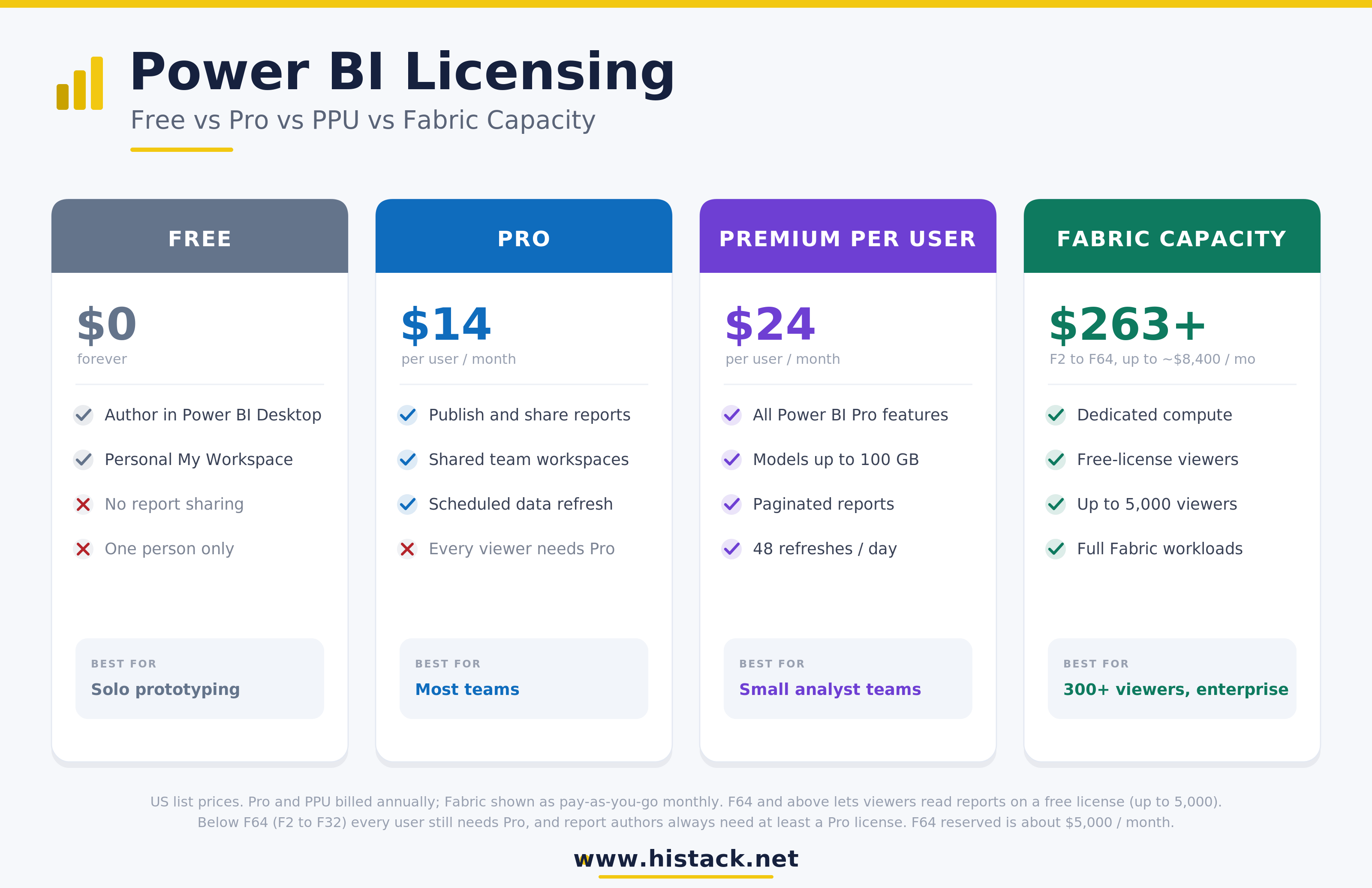
What each of the Power BI licenses lets you do
The Power BI licenses differ on two axes: the features you get, and who has to hold a paid seat. Keep both in mind as you read.
Power BI Free License
A Power BI free license lets one person do real work. You can connect to data, model it, build reports in Power BI Desktop, and publish to your personal My Workspace. The wall you hit is sharing.
A free user can’t hand a report to a coworker or publish an app that others open, with one exception I’ll come back to under Fabric.
For a solo analyst prototyping something, Power BI free licenses are genuinely useful. For a team that needs to collaborate, they’re a dead end.
Power BI Pro License
Power BI Pro is the license most organizations run on. It lets you publish to shared workspaces, collaborate with other Pro users, distribute apps, and schedule data refresh. The part that surprises people: sharing is symmetric. If you hold Pro and your audience doesn’t, they still can’t open the report. In a pure Pro setup, every author and every viewer needs their own $14 seat. Fifty report consumers means fifty seats.
Power BI Premium Per User License
PPU sits between Pro and full capacity. A Power BI Premium Per User license costs $24 per month and adds the features data teams ask for once they outgrow Pro: semantic models up to 100 GB, paginated reports, the XMLA endpoint for external tools, deployment pipelines, and refresh up to 48 times a day.
The same symmetry rule applies here. Content published to a PPU workspace can only be opened by other PPU users, so you can’t pair a few PPU authors with hundreds of Pro viewers. That’s precisely why PPU fits small analyst teams and stops making sense once your audience grows.
Premium capacity and Fabric F-SKU
Here is where per-user pricing ends. A Power BI Premium license in the old model meant a P SKU, a block of dedicated capacity your reports run on instead of the shared pool. Microsoft has folded that into Microsoft Fabric, the P SKUs are being retired, and new purchases are Fabric F SKUs.
A Microsoft Fabric license at the capacity level buys compute, not seats. The number that matters is F64. At F64 and above, anyone with a free license can view reports hosted on that capacity, up to roughly 5,000 viewers. Below F64 (F2 through F32), you still need Pro for every user, so small capacities give you performance, not licensing relief. Authors who publish always need at least Pro, even on a large capacity.
Power BI Per-user vs Fabric capacity pricing
All Power BI licenses eventually answer one question: are you paying per person, or per capacity?
Per-user pricing is simple and scales in a straight line. Ten users on Pro is $140 a month. A hundred is $1,400. Two hundred is $2,800. It stays cheap until your viewer count climbs, then the bill climbs right along with it.
Capacity pricing is flat. F64 runs roughly $8,400 a month pay-as-you-go, or about $5,000 a month on a one-year reservation, regardless of how many people read the reports (within that 5,000-viewer ceiling). The trade is that you pay the same whether 60 people or 4,000 people use it.
So there’s a break-even point, and it’s worth calculating before you commit. Compare the capacity bill against what you’d spend on Pro seats for your viewers.
Rule of thumb: F64 reserved (around $5,000 a month) is roughly 350 Pro viewers at $14 each. Below that headcount, per-user Power BI licenses are cheaper. Above it, capacity wins, and the gap widens quickly.
Authors are a separate line on the invoice. Even on F64, the people building and publishing content still need Pro or PPU seats. Capacity removes the viewer tax, not the builder tax.
When you actually need Fabric or a Premium license
Reach for capacity when one of these is true.
Your viewer count crosses roughly 300 to 350 people. Past that line, buying a Power BI premium license as Fabric capacity costs less than stacking up Pro seats.
You need Premium-only features across a wide audience. Paginated reports, large models, or frequent refresh delivered to hundreds of viewers is a capacity job, not a per-user one.
You’re building beyond Power BI. Fabric capacity also powers data engineering, warehousing, real-time intelligence, and notebooks on the same compute, so if reporting sits inside a broader Fabric project, the capacity is already paid for.
You want free-license viewing. The F64 threshold on a Microsoft Fabric license lets thousands of people read reports without individual seats.
Stay on per-user licensing when your audience is small, your needs fit inside Pro, and you’d rather not operate a capacity. Most teams under a couple hundred users come out cheaper and simpler on Pro.
A short decision flow
Run through these in order and stop at the first yes.
Working alone and only building for yourself? A Power BI free license covers it. Spend nothing.
Sharing reports with a handful of colleagues? Put everyone involved on Power BI Pro. This is the right answer for most small teams.
A few analysts need large models, paginated reports, or the XMLA endpoint, but the viewer group is also small? Give those users a Power BI Premium Per User license and keep the group tight.
Distributing to a few hundred viewers or more, or need Premium features at scale? Move to Fabric capacity, and size at F64 or above so viewers read content on free licenses.
Already running a Fabric project for engineering or warehousing? The capacity is bought, so publish your Power BI content there and license only your authors with Pro.
The mistake I see most often is jumping to capacity too early because it sounds enterprise-grade, or clinging to per-user seats long after 500 viewers turned them into the expensive option.
Count your viewers, check the break-even, and let the number pick the plan. When your Power BI licenses match your actual audience, the bill takes care of itself.